
Is Your WhatsApp At Risk? Check If You Have a Backup – And Get One If You Don’t.
Your WhatsApp messages, chats, pictures and videos are too important to lose. Chats with family and friends, business discussions, kids’ photos, reminders, and so many pieces of information – when we need to look something up, it’s probably in WhatsApp somewhere. But what if something happens to your phone? An important chat gets deleted? What if the phone is lost?
Previously, WhatsApp had at least a partial backup built it. Since 2024, that is no longer the case – and most people don’t even know that they are at risk of losing everything.
This tutorial will show you how to easily check if your WhatsApp is safe – and how to make it safe if it isn’t.
Short answer: open WhatsApp, go to Settings > Chats > Chat backup and look at the “Last backup” date. If that date is not recent, your chats, photos and videos are not protected - set up a backup right away.
Let’s start with checking your current backup status.
How To Check WhatsApp Backup Status
It’s easy to check your WhatsApp backup status – just a few clicks. Here is how:
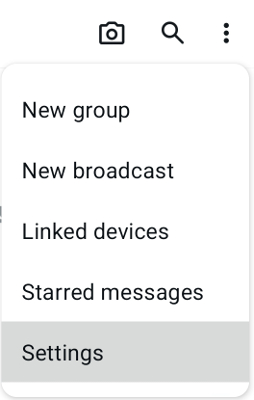
- Open your WhatsApp, and open the “3 dots” menu in top right corner. Select “Settings“.
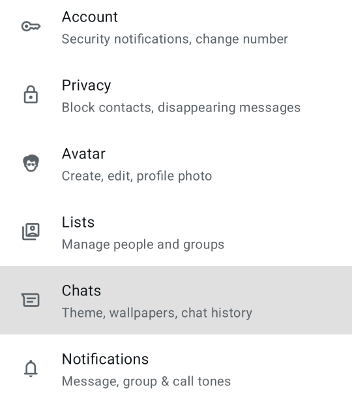
- Go to “Chats”
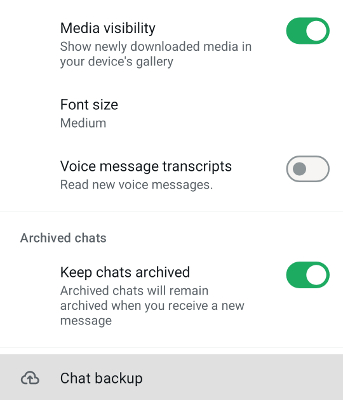
- At the bottom, go to “Chat backup”
- At the top of the “Chat backup” screen, you will see your backup status, just above the green “Back up” button. Specifically, it shows the “Last backup” date.
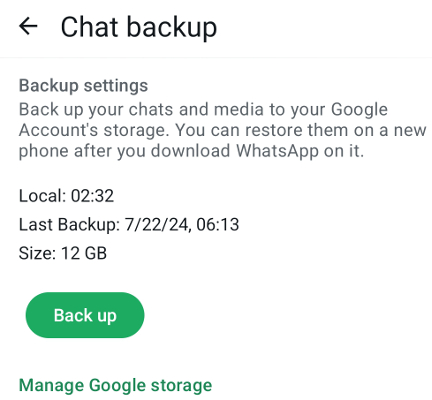
- If the “Last backup” date is not recent, you are not safe!


What should I do if my WhatsApp backup is not up to date?
Set up a backup right away. Without an up to date backup, a lost or damaged phone, a deleted chat or a blocked account can take your WhatsApp history with it - and getting protected takes just a few minutes.
Fortunately, setting up a backup is easy. It takes just a few minutes, and you can even set it up so that you can retrieve deleted messages, easily search your chats, and access your backup even without your phone. You’ll thank yourself later for spending a couple of minutes on that today.
The recommended backup option, that you can set up in just a few minutes and get protected, is WHAMetrics Backup. You can find it here:
What does a proper WhatsApp backup cover?
A proper WhatsApp backup must cover everything that your WhatsApp has, and must protect you from all kinds of potential loss.
What should a WhatsApp backup include:
- WhatsApp chats (both personal and groups)
- WhatsApp photos and videos
- WhatsApp stickers, archive, history
What should a WhatsApp backup recover from:
- Lost phone or damaged phone
- Deleted messages or photos
- Blocked accounts
- Hacked accounts
It is also important that the backup is accessible anywhere: if you lose your phone, for example, you want to be able to just open your backup from another devices or even online, and view your messages.
Plus, an accessible backup allows to you ensure that your stuff is actually safe and protected, instead of blindly trusting someone with safeguarding your stuff.
While you can review our comprehensive guide on WhatsApp backup options, the recommended (and easiest) option that covers all of the above is WHAMetrics Backup. Let’s see how to set it up.
Which WhatsApp backup software should I use?
We recommend WHAMetrics Backup: it keeps your chats, photos and videos backed up to the Cloud, your PC, a USB drive or an SD card, and you can open the backup anywhere - even without your phone.
WHAMetrics Backup allows to backup your WhatsApp in a variety of options, and answers the requirements we outlined above on what the backup should deliver (especially the part about being accessible).
It allows to keep your WhatsApp backup anywhere: on a variety of Cloud options, on your PC, on a USB drive or an SD card. You are in control of your backup, and not beholden to Google or Meta.
A WHAMetrics backup is useful not just in case of disaster: you can use it to easily retrieve deleted messages, to search your chats and messages, and generally to use WhatsApp more effectively.